If you want to understand what WordPress security vulnerabilities can do to your website, you’re in the right place.
In this article, we’ll explain what happens when a plugin has a WordPress security vulnerability and then offer solutions to protect your site against them.
We’ll look at:
- The main types of WordPress security vulnerabilities.
- Why they happen in the first place.
- The steps you can take to reduce your risk.
Let’s start with the flaws attackers most commonly target in WordPress.
Watch the video version of this post:
What kind of WordPress security vulnerabilities are there?
A WordPress security vulnerability is a weakness or flaw in a plugin, theme, or WordPress core itself. When an attacker exploits this weakness, they can gain unauthorized access to your website, inject malicious code, or steal sensitive information.
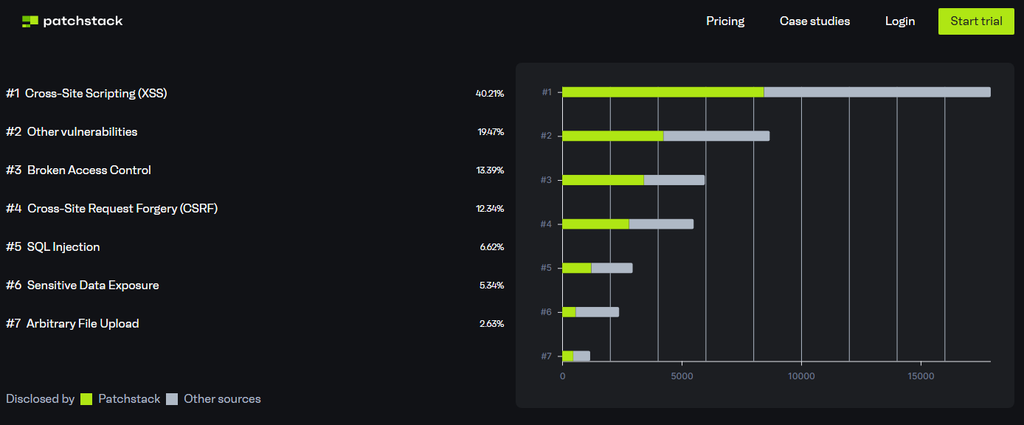
According to Patchstack, these are the most common WordPress security vulnerabilities:
- SQL injections. This is when an attacker sends commands to your database, letting them read, change or delete whatever is stored there.
- Cross-site scripting (XSS). This is when a plugin displays user input on a page without cleaning it first. It lets an attacker inject a malicious script into your site that runs in other visitors’ browsers. It can hijack a logged-in user’s session and act on their behalf.
- Broken access control. This is when a plugin doesn’t check whether the person making a request has permission to do it. An attacker can then use features or reach data meant for other users. Sometimes admin settings.
- Cross-site request forgery (CSRF). This is when a plugin doesn’t verify that an action really came from the user who seems to be making it. An attacker can then trick a logged-in user into doing something they didn’t intend, like changing a setting.
- Sensitive data exposure. This happens when a website or plugin accidentally reveals sensitive information to people who shouldn’t have access to it. This could be anything from customer details, to important files.
- Arbitrary file upload. This is when a plugin doesn’t check uploaded files properly, so an attacker can upload something malicious like a PHP script.
So now we know what the most common types of vulnerabilities for WordPress are, let’s take a look at why they happen in the first place.
Where do WordPress security vulnerabilities come from?
According to Patchstack’s State of WordPress Security report, most WordPress security vulnerabilities come from plugins, rather than WordPress itself.
They found 11,334 vulnerabilities across the WordPress ecosystem in 2025, which is a 42% increase from 2024.
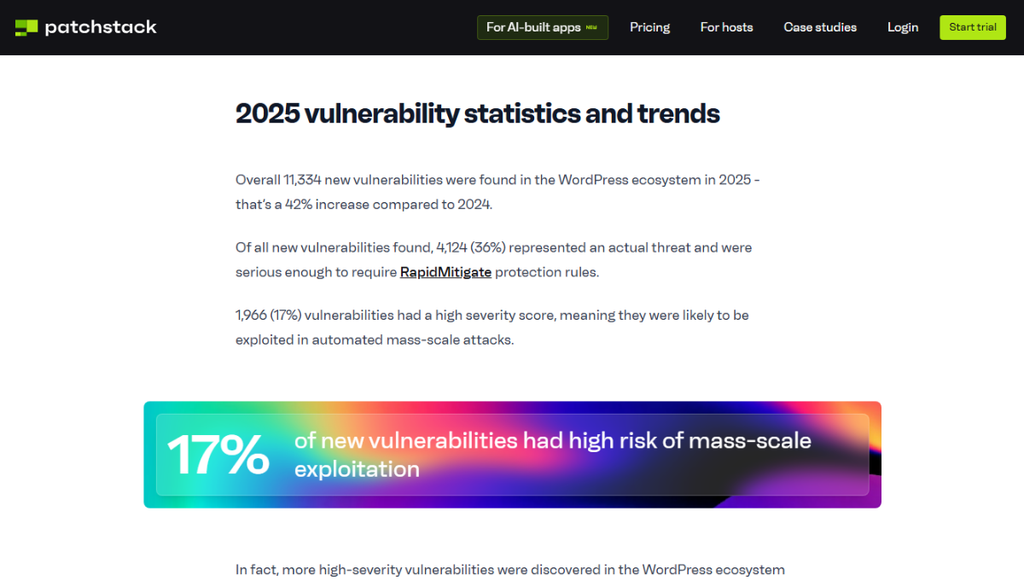
Surprisingly, most of these WordPress security vulnerabilities are in plugins:
- 91%, to be specific.
- The other 9% are WordPress theme vulnerabilities.
- Only 6 vulnerabilities were in WordPress core.
This shows that site owners should pay careful attention to the tools they use, especially when it comes to WordPress security vulnerabilities. At the very least, choose plugins that developers regularly update and actively maintain.
How do vulnerabilities end up in WordPress plugins?
A flaw can enter a plugin as a developer updates or adds new features over time. They can unknowingly create new pieces of code that have a vulnerability.
There’s usually no malicious intent in security lapses. It can happen if there are no processes in place, if new features are rushed, or if developers are inexperienced.
But even if there’s no intent behind these vulnerabilities, they still happen, and it’s worth walking through the fallout of what that might be.
What happens when a WordPress plugin has a security vulnerability?
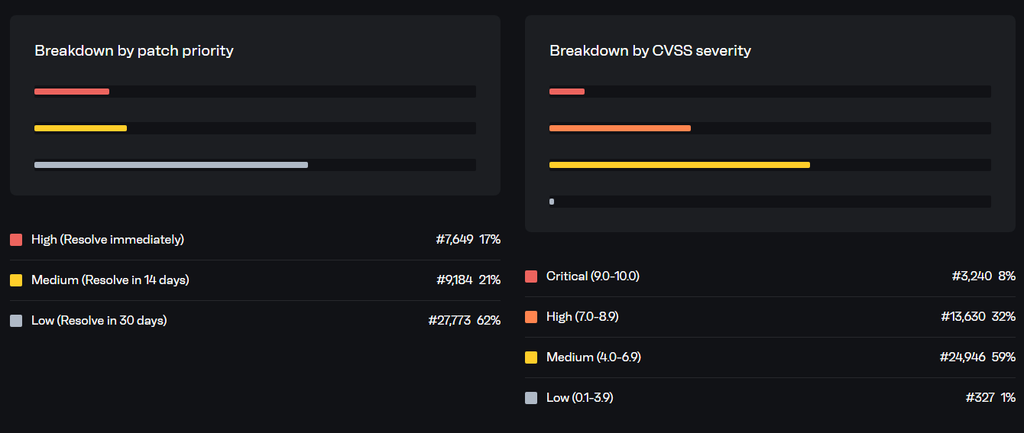
Just because a WordPress plugin, theme, or even WordPress itself has a security vulnerability, doesn’t mean it will be exploited. Patchstack has a pretty clear breakdown of priority levels when it comes to vulnerabilities, and the majority of these (62%) have a low priority.
However, if your site does happen to be exposed to an attacker who wants to take advantage of one of these vulnerabilities, here’s what might happen.
Your site could be targeted even if it’s small
Hackers often mass scan websites to determine if they have a known vulnerable plugin or component. That means your site doesn’t have to be popular or handle sensitive information to become a target. If your WordPress site runs a vulnerable plugin, it may get attacked. What happens next depends on the vulnerability the attackers find.
Your website can send spam emails
The attacker may hijack your website to send thousands of spam messages about fake promotions, prize offers, or phishing emails. They might use automated bots or exploit a flaw in your contact forms or sign-up pages to do this.
This forces your site to generate and send malicious messages. Because these messages appear to come from a reputable site, spam filters are less likely to block them. So, attackers can trick some recipients into believing the emails are genuine. As a fallout from this, your emails will start to be blacklisted, having a huge impact on future legitimate emails reaching inboxes.
Sensitive information may be stolen
Attackers will also check if the site has valuable assets or information. When they do, the hacker can pull data straight from your database, or inject a script that captures data as people type it in.
This may include:
- Login credentials, such as usernames, emails, and passwords as people type them in.
- Ecommerce data like customer names, billing addresses, or phone numbers.
- Member lists or private user info.
- Active session tokens.
- Database information.
What if they don’t find any valuable data? If they don’t, and the vulnerability lets them run code remotely, for example, the attacker may still install an HTTP relay and resell access to the site as a proxy farm.
Crypto or ads could be injected into your website
When hackers compromise a site, they can also add content you never created. For example, they may add unwanted advertisements, links, cryptocurrency-related content, or promotional messages into your pages. You may not notice this immediately, especially if the unwanted content only appears to certain visitors or on specific pages.
Not to mention, if the attacker gains enough access, they can change your site’s content. They can change pages, posts, settings, or other parts of your website without your permission.
You may have to deal with legal issues
Websites that collect or store personal data must also protect it by law. So, if a security breach exposes personal information, you may face legal consequences. The severity of those consequences depends on where you operate, what information the breach affects, and your role in handling that data. For example, in the EU, you’d have to report a personal data breach within 72 hours.
Generally, the consequences of a security breach are pretty clear. You may have to deal with:
- Loss of trust.
- Damaged reputation.
- Lost revenue.
- Lost data.
- Potential SEO problems.
Your customers may also suffer harm if attackers expose their personal or financial information.
How long does it take for hackers to exploit websites?
When hackers discover a new plugin vulnerability, they can make their first attack attempt in as little as five hours.
That’s the median time to target some of the most heavily exploited security flaws Patchstack tracks. However, the exact time may vary depending on how complex the exploit is and how long it takes the attacker to identify a vulnerable website.
Simple logical bugs like those found in a plugin vulnerability can lead to serious attacks when a hacker finds a way to exploit them at scale.
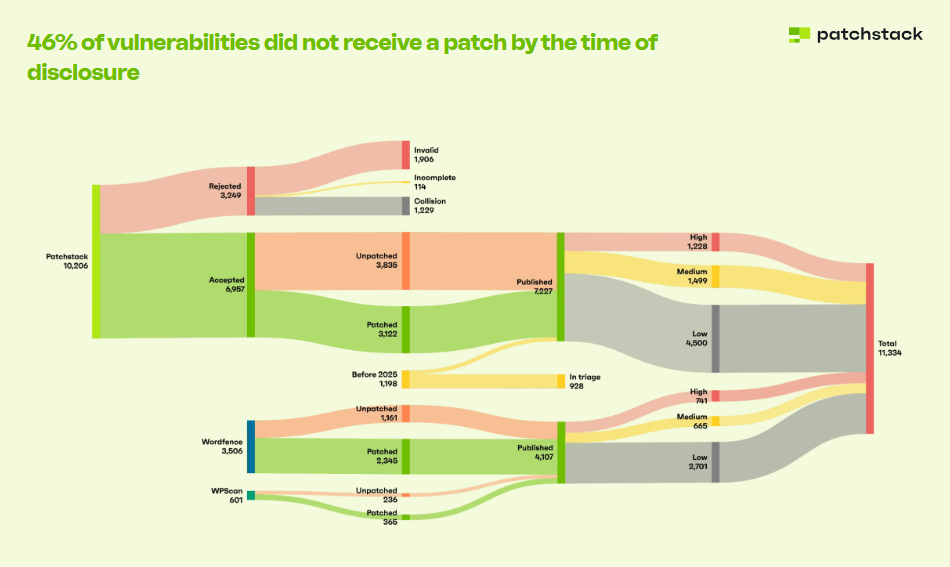
The bigger concern, however, is that Patchstack found vendors didn’t release a fix for some 46% of vulnerabilities disclosed last year. This creates a window where attackers know about the vulnerability, but the developer may not have released a fix yet.
Traditional hosting has its limits too
Traditional hosting defences like WAFs have limitations, even though they should provide the first line of defense. They cannot detect and block every attack targeting a WordPress-specific vulnerability. In fact, most hosts can only block 26% of vulnerability attacks.
What you should do to protect your site from WordPress security vulnerabilities
So, what can you do if hackers can exploit a vulnerability before a security patch arrives and traditional security tools you probably use fall short?
There are a few things to do to reduce the risk of a vulnerable plugin affecting your website. Let’s look at them.
How to protect your site from WordPress security vulnerabilities (preventative measures)
Here are the preventative measures you can take:
Make your WordPress site static with Studio
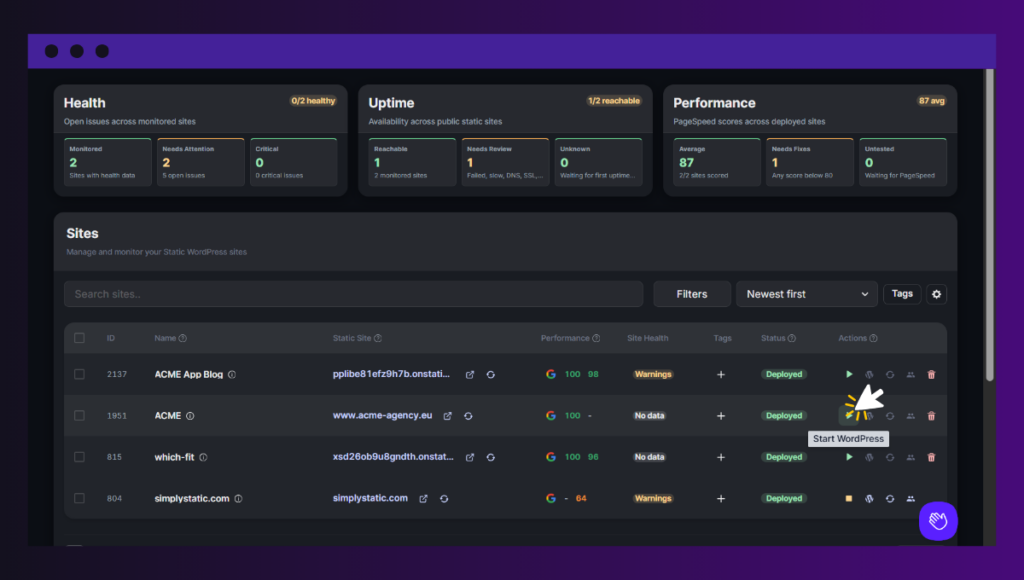
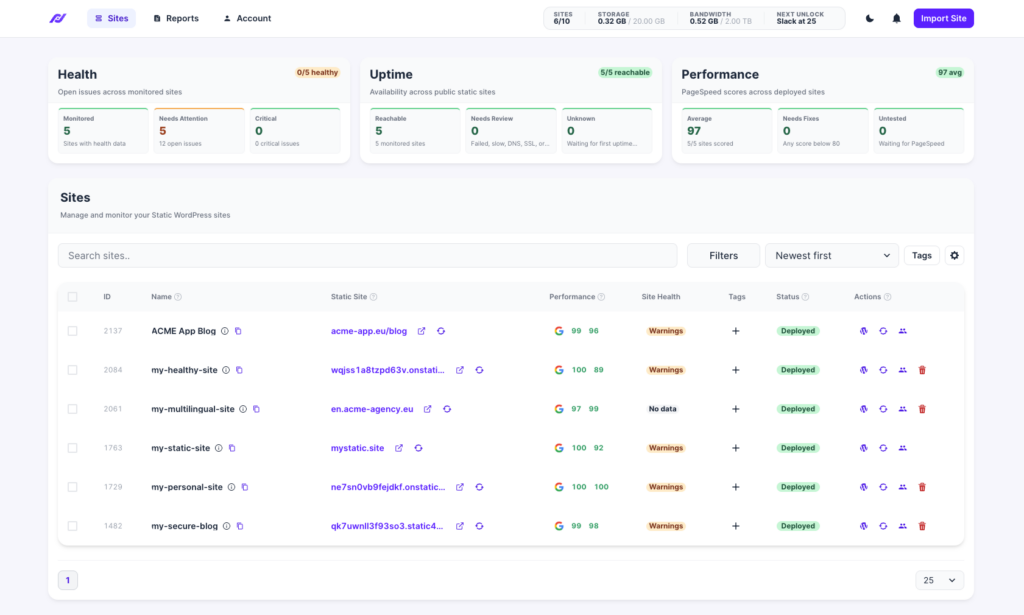
Simply Static Studio is a platform where you manage and publish static WordPress sites. It keeps your WordPress installation private. So visitors never interact with it directly. Instead, they only access the static version of your WordPress site.
You also use WordPress purely as a private CMS you can shut down and turn back on only whenever you want to edit your site.
How this helps with security issues
When WordPress can automatically start when you need it and shut down when you’re done:
- You have more time to deal with security issues. If one plugin has a vulnerability, you can power down WordPress without feeling the same pressure to update it immediately as you would in a live WordPress installation. This never impacts your static site – it stays live.
- It creates a smaller attack surface. If WordPress isn’t running, there’s simply less infrastructure available to target. Your WordPress login, dashboard, database, and other live components are hidden.
- You can wait for a fix when necessary. You can keep WordPress offline while waiting for the plugin developer to release an update. Then, turn it on, update or remove the affected plugin, test your site, publish it, and then shut down WordPress again.
- You reduce exposure to WordPress-specific attacks. You don’t have to constantly battle SQLi, XSS, brute-force attacks, DDoS attacks, and other cyber attacks.
The best part is you don’t need additional security plugins like Wordfence to protect your site further.
Upgrade to a host that takes security seriously
If static WordPress isn’t right for you right now, we recommend making sure your hosting provider takes security seriously and puts it at the forefront of their features.
These features should include:
- Firewall protection.
- Malware scanning.
- Bot protection.
- Regular security updates.
Before purchasing a plan, ask the provider about their incident response procedures and data backup policies. A provider with a proactive approach to security should also offer features such as server hardening, DDoS protection, and secure server configurations.
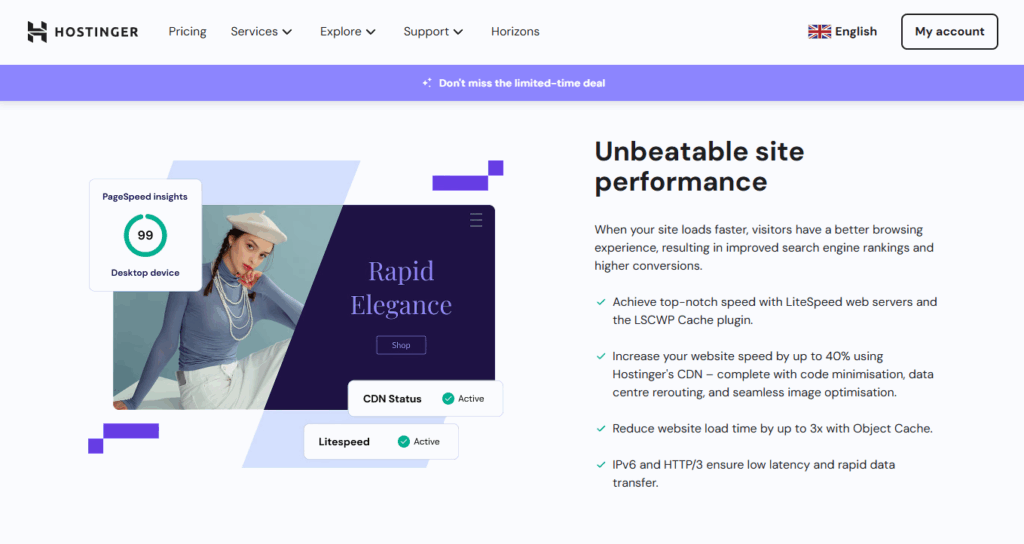
Looking for a WordPress host? Check out our guide to the 8 best WordPress hosting options by type. Whether you’re a developer or not, we’re sure you’ll find an option that fits your project.
Add a WordPress security plugin and WAF
Because traditional hosts primarily secure websites at the server level, you should add another layer of security on top.
WordPress security plugins like Sucuri, WPScan, and Wordfence can help. They scan your website for malware and suspicious activity.

They also:
- Send automated alerts.
- Provide web application firewall protection.
- Offer other hardening options to lock things down.
As your site grows and you add more features, you may need even more advanced security monitoring. One such tool is Patchstack. It monitors WordPress plugins, themes, and core for known vulnerabilities and can help you respond to WordPress security vulnerabilities much faster.
Make sure to use reliable plugins
Stick with well-supported plugins from reputable developers in the official directory and delete anything you’re not using.
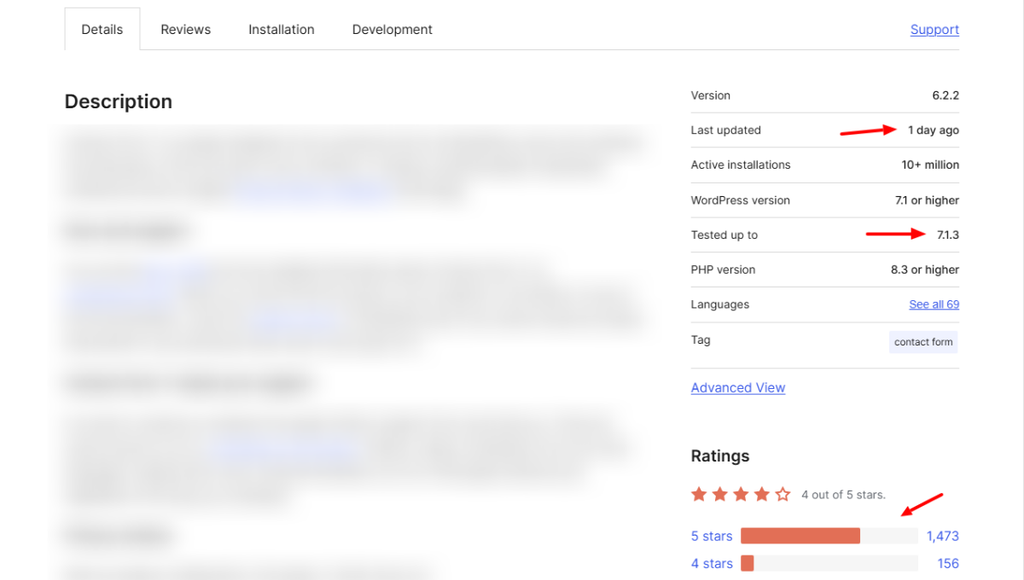
A reliable plugin receives regular updates that have important security fixes. So, when a plugin hasn’t been updated in months or years, that’s a red flag. It might also mean that the developer has lost interest in the plugin and will no longer keep improving it.
Inactive plugins can also break when your CMS updates. Or they may contain vulnerabilities that the developer is no longer working to fix.
When you audit new or existing plugins, ask yourself:
- Who is the developer?
- How popular is the plugin? Although this doesn’t mean they’ll be free from vulnerabilities, it does mean they’ll fix them quickly or risk their reputation and user base.
- Does it work with the latest WordPress version?
- When was it last updated?
- Does it have active support?
You can check the WordPress.org page for the last updated date, active installations, support activity, and recent reviews. For premium plugins, make sure to check their official website’s changelog if you can find it, and external review sites like Trustpilot.
Secure your login and access
Next, ensure only the right people have access to the website and that they use strong credentials.
To do this:
- Encourage every team member to use strong and unique passwords for their accounts. They should never reuse the same password across different sites.
- Enable two-factor authentication (2FA). Plugins like WP 2FA can help you set up mandatory 2FA for all accounts with the Editor role or higher.
- Only grant administrator rights to those who make technical changes. Editor, SEO managers, and guest contributors should be granted only the permission they need for their specific roles.
- Use a password manager to create complex passwords of at least 16 characters.
- Remove any users that use basic usernames (i.e., “admin” or “administrator”).
- Limit the number of login attempts to 3 or 5 failed attempts. After that, temporarily block further attempts to make brute-force logins much harder.
It may sound simple, but you’d be surprised how often weak passwords, missing 2FA, and poor user management lead to account takeovers and other cyberattacks. At the same time, these are some of the easiest WordPress security issues to fix.
Reduce features WordPress exposes as much as possible
Some of the areas you need to review further to reduce their exposure include:
- XML-RPC.
- REST API.
- File editing from the WordPress dashboard.
- User enumeration.
- WP_DEBUG and error messages.
Security tools like Wordfence allow you to disable XML-RPC, block user enumeration, and disable the built-in file editor with just a few clicks. To finish the job, ensure that WP_DEBUG is set to false in your wp-config.php file so WordPress doesn’t display debug messages on the live site.
Disabling these features makes it much more difficult for attackers to bypass these restrictions. What you should keep in mind, though, is that the settings available may vary depending on your hosting environment and server configurations. So, check with your hosting provider to help you disable these features effectively.
Secure file permissions
Let’s say an attacker manages to upload a file via a plugin vulnerability. They often install so-called web shells such as wp2shell.
These PHP scripts act as a permanent backdoor that they can use to:
- Execute commands on the server.
- Read files and database information.
- Download and run additional malicious code.
You can prevent this risk by blocking PHP files in the uploads directory. WordPress normally uses this directory to store media files, so there’s usually no reason for PHP files to execute there.
You should also make sure that your WordPress files and folders have the right permissions. Only the users and processes that need to modify them should have write access.
These settings can limit what an attacker can do if a vulnerability allows them to upload or modify files on your website.
For more detailed steps on protecting WordPress sites, read our guide to web security best practices. It covers the most important steps to protect your WordPress site.
Keep on top of WordPress security vulnerabilities today
WordPress is the most heavily targeted CMS. And it’s now clear that attackers specifically target it through flaws they find in plugins. You can reduce the risk of vulnerable plugins by following the preventive measures we cover in this post.
One security platform to consider is our static WordPress host: Simply Static Studio. Studio keeps your WordPress installation private and serves visitors a static version of your site instead.
It also lets you start and shut down WordPress when you don’t need it. The main benefit is that this exposes little to no WordPress components, plugins, or features to attackers.
Want to reduce your WordPress attack surface altogether? Try Simply Static Studio and keep your WordPress installation 100% private.