It’s been barely a month since our last update, and we’ve been heads down building what I think is the most impactful set of features we’ve ever shipped for Static Studio – fully automated performance optimization.
If you’ve ever spent hours tweaking PageSpeed scores – installing optimization plugins, configuring lazy loading, fiddling with render-blocking resources – you know the pain.
We wanted to eliminate that entirely, and I’m excited to show you how.
The Problem
WordPress sites are notoriously difficult to optimize for Google PageSpeed. The typical site loads dozens of CSS and JavaScript files, most of them render-blocking, and images are almost never served in modern formats like WebP. The result? Low PageSpeed scores, especially on mobile.
The usual fix involves installing 2-3 additional plugins (caching, image optimization, CSS/JS minification), configuring each one, hoping they don’t conflict, and then running PageSpeed again to see if the score actually improves. Rinse and repeat.
We think this should be zero-config and fully automated – and now it is.
WebP Conversion & Image Optimization
As announced in our last update, we enabled Bunny Optimizer for every site on Static Studio – for free.
This handles the image side of PageSpeed automatically:
- Automatic WebP conversion for all images (with fallbacks for older browsers)
- Responsive image transformation across different screen sizes
- Image compression without visible quality loss
All of this runs on the edge, meaning it doesn’t affect your push times at all – same speed, better results. And just to be clear: this is included at no extra cost for all Studio sites. Normally, you’d pay $9.50/month per site for this elsewhere.
CSS & JS Aggregation
This is the big new one. We now automatically aggregate and minify your CSS and JavaScript files during the static export (it’s opt-in for now – you can enable it in Tools -> Simply Static Studio -> Optimization -> Minify & Aggregation).
What does that mean in practice?
Instead of your browser loading 8-12 separate CSS files and a handful of JavaScript files (each one a separate HTTP request that blocks rendering), we combine them into optimized bundles. Fewer requests, smaller files, faster load times.
Here’s what happens under the hood:
- Multiple
<link>stylesheet tags get combined into a single CSS bundle - Multiple
<script>tags get combined into fewer JS bundles - Everything gets minified – whitespace, comments, and unnecessary code stripped out
- Execution order and dependency chains are preserved (so nothing breaks)
- Relative URLs in CSS (background images, font paths) are resolved automatically
This runs as part of the static export pipeline, so there’s nothing to configure – it just works. The aggregation step runs after CSS/JS deferral and before Critical CSS generation, so the entire optimization chain is properly sequenced.
Critical CSS Generation
This is the final piece of the puzzle – and it’s the one that really moves the needle on PageSpeed scores.
The problem with deferring CSS (a standard performance technique) is that the browser initially renders the page without styles, then re-renders once the full CSS loads. This causes layout shifts – elements jump around on screen – and Google penalizes that heavily in the Cumulative Layout Shift (CLS) metric.
Critical CSS solves this by extracting only the CSS needed for the above-the-fold content (what the user sees before scrolling) and inlining it directly into the HTML. The browser can render the visible content instantly with the correct styles, while the rest of the CSS loads in the background.
We built this using Penthouse, with headless browser integration that renders each page, identifies the above-the-fold CSS, and injects it into the export process. It supports multiple viewport sizes (mobile and desktop) to make sure the critical CSS covers both.
The result: zero CLS, fast First Contentful Paint, and significantly higher PageSpeed scores – all without you touching a single setting.
Zero Config, Fully Automated
To be clear, you don’t have to do anything.
There are no settings to configure, no plugins to install, no checkboxes to tick. Every site on Static Studio gets the full optimization pipeline automatically:
- Static Export – WordPress → static HTML + assets
- Image Optimization – WebP conversion, responsive sizing via Bunny Optimizer
- CSS/JS Deferral – Non-critical resources deferred for faster rendering
- CSS/JS Aggregation – Multiple files combined and minified into fewer bundles (if enabled)
- Critical CSS Generation – Above-the-fold CSS extracted and inlined
This is the same optimization pipeline that other platforms charge extra for or require you to configure manually. We just run it automatically on every push.
What This Means for Your Scores
Every site is different, but here’s what we’re seeing across our customer sites:
- Fewer render-blocking resources (from 8+ files down to 1-2 bundles)
- Significantly reduced total CSS/JS payload (20-40% smaller after minification)
- Zero CLS on both mobile and desktop
- Meaningful improvements to FCP and LCP, especially on mobile
If you want to check your own scores, you don’t even have to leave the platform – just open the new Performance screen.
Performance Screen
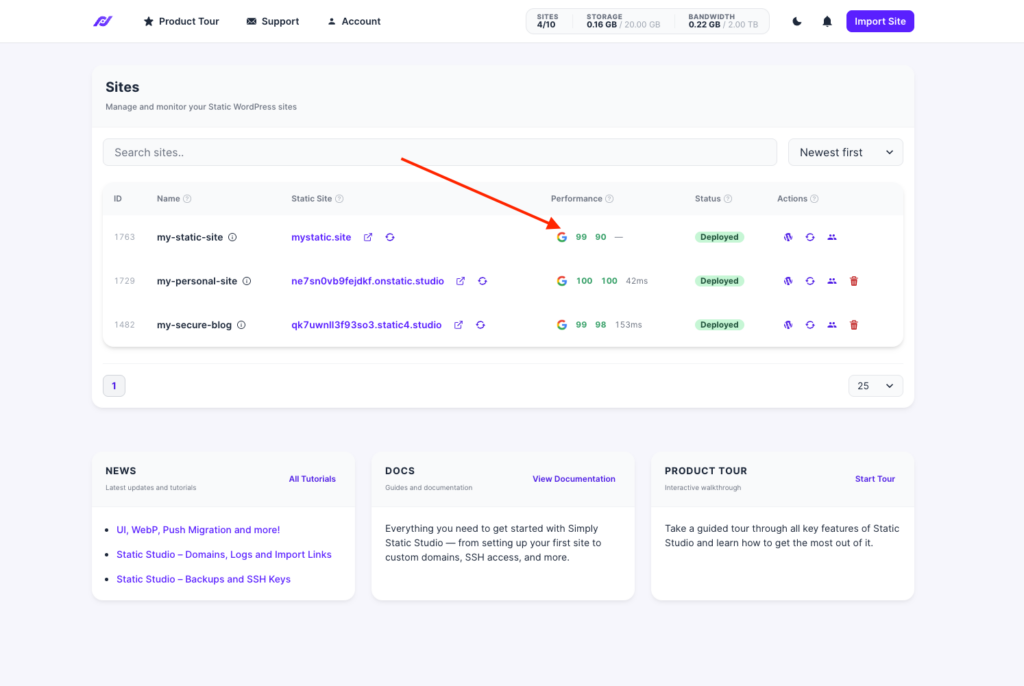
We also shipped a brand-new Performance screen directly into the Studio dashboard. Click on the Performance column for any site, and you get three tabs:
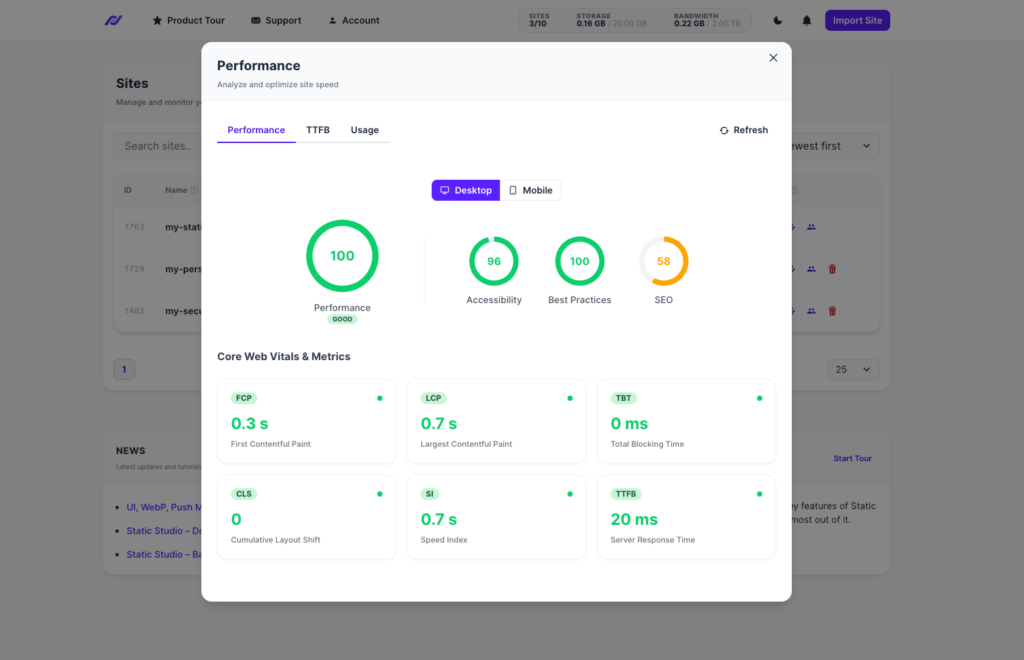
PageSpeed Insights
Your Google PageSpeed scores, pulled directly from the Google API and refreshed automatically every day. Toggle between mobile and desktop, or hit refresh manually whenever you want. No extra tools, no copy-pasting URLs – it’s just there.
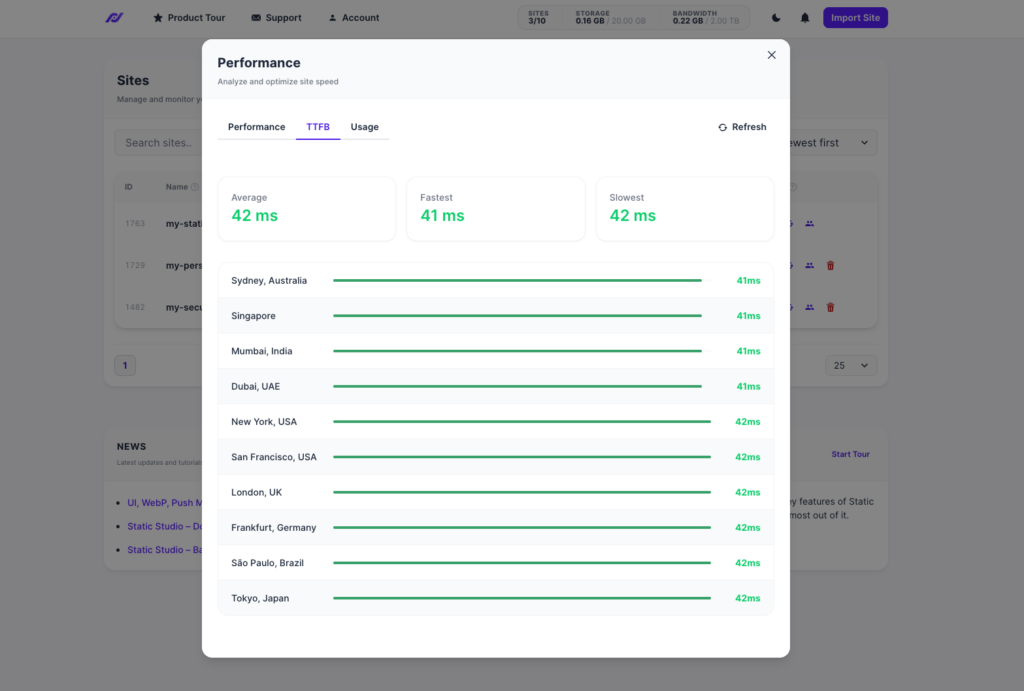
Global TTFB
See exactly how fast your site responds from different locations worldwide. We distribute your static site across the entire globe for minimal latency, and this tab shows you the proof – time to first byte from every region.
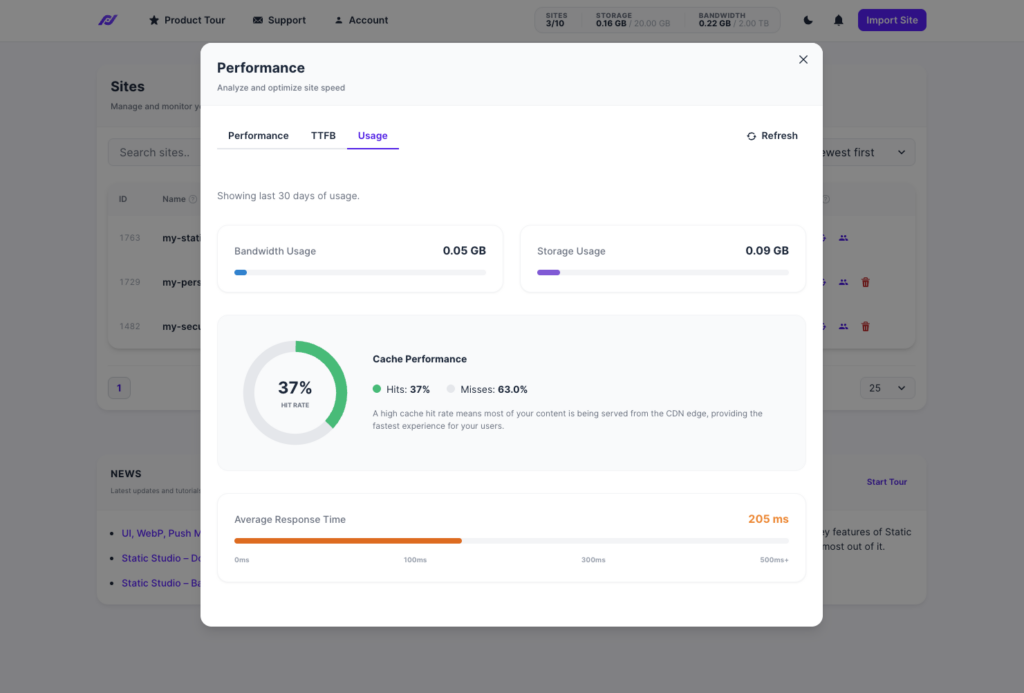
Usage
Your bandwidth, storage, and cache hit rate over the last 30 days. See how much of your traffic is served from cache (the higher, the better) and track your average response time across 120+ data centers worldwide.
This is the dashboard we always wanted to build – you optimize your site once (or rather, we do it for you), and then you can just watch the scores. No more switching between tools or running manual reports.
Looking Ahead
We’re not stopping here. Our roadmap for the next few months includes:
- Agency Program (whitelabel mode, tagging, team management) – soon!
- Unused CSS/JS removal (tree-shaking) for even smaller payloads
- Full API coverage for the platform
As always, if you feel something is missing for your specific workflow, let us know (support@simplystatic.com)!
I couldn’t be more excited about how far Static Studio has come in just a few months – we’re making performance optimization something you never have to think about again.
That’s the whole point of static WordPress: fast, secure, and zero maintenance.
Table of Contents