
Site Health & Reporting
See what changed on your static site.
Check your latest release, follow a warning to the affected URL, and share the findings with your client.
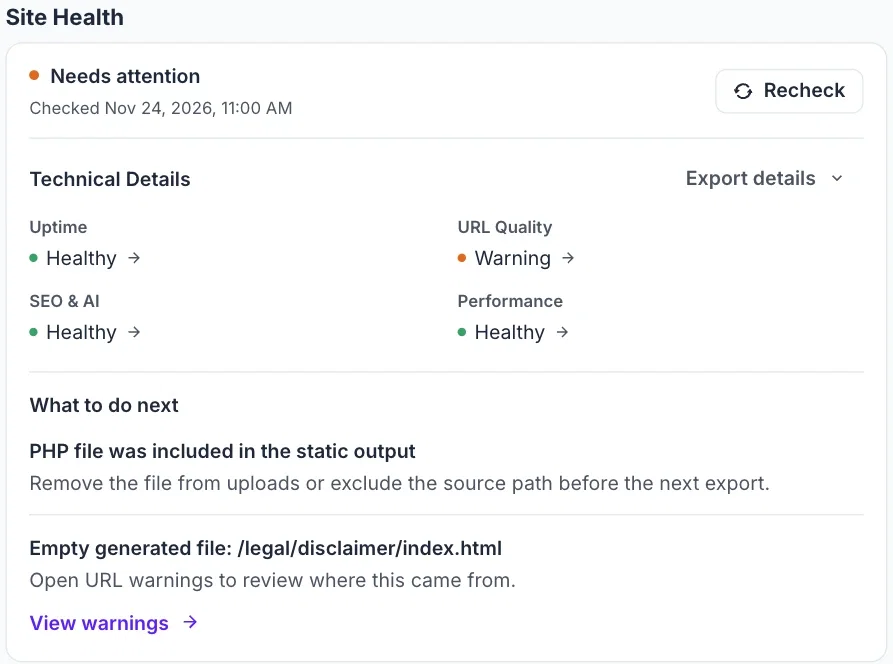
Site health
Follow a warning to its source.
Open a deployment snapshot to see which checks passed. Studio links warnings to the affected URLs and suggests what to check next.
AvailabilityReview uptime, response time, SSL, DNS and CDN delivery.
Changes in the releaseInspect changed URLs, redirects and files in the static output.
Alert rules
Decide when your team hears about a problem.
Choose how long an outage can last or how far a PageSpeed score can fall before Studio sends an email.
RecipientsSend alerts to the people responsible for the site.
Recovery emailsLet the same people know when the incident clears.
Client reports
Give clients a record of every release.
Open a saved report to see what shipped, how the site performed and which fixes need attention.
Share the resultDownload a PDF, create a secure share link or schedule weekly and monthly summaries.
What else does Studio check?
Search visibility
Review indexability, robots.txt and sitemap checks on the published site.
AI readiness
See whether AI crawlers can reach your content and whether llms.txt or Markdown versions are available.
Mobile and desktop speed
Compare PageSpeed results and Core Web Vitals to spot slow loads and layout shifts.
Studio pricing
Choose storage for your sites.
Site Health, alerts and reporting are included with Studio. Choose your storage to see the hosting price and included monthly bandwidth.
The White Label Add-On lets you put your own logo and colors on reports.
No credit card required.
Questions
Site Health, explained.
Which version of my site does Studio monitor?
Studio checks the published static site. You can take the private WordPress editor offline while monitoring continues.
When is a report created?
Studio saves a snapshot after a deployment. Open Report History to revisit the results for a specific release.
Which alerts can I configure?
Choose uptime, PageSpeed and critical SEO alerts for each site. You can set thresholds and choose whether to send a recovery email.
Can I send reports under my own brand?
Yes. White Label adds your logo and colors. PDF downloads, share links and scheduled summaries are available with Studio.
See how your own site performs.
Start a trial, or check your WordPress site for static compatibility first.