
ON-DEMAND WORDPRESS HOSTING
Start WordPress when you need it.
Stop it when you don’t.
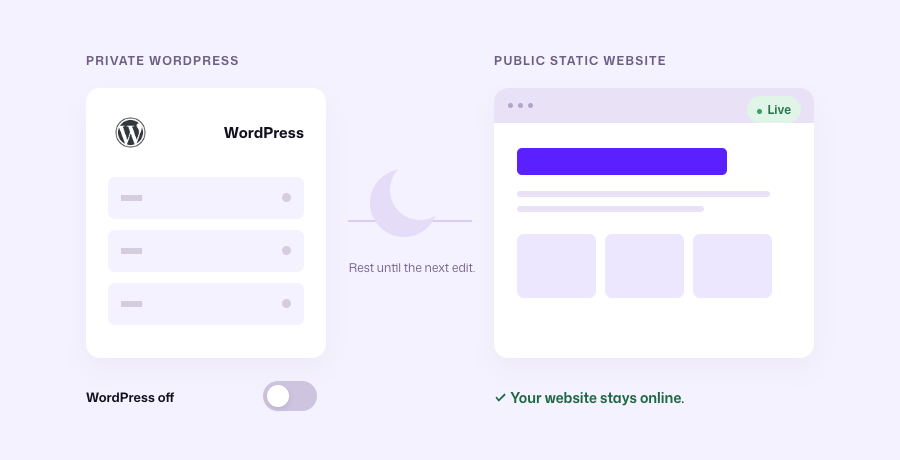
Edit in the real WordPress admin. Publish a static copy to the CDN. Then take WordPress offline while the public website stays available.
Real WordPress for editing. No public WordPress runtime between updates.
Your website needs to be online.
WordPress doesn’t.
Most WordPress websites keep the admin, PHP, and database online around the clock—even when the site is edited only a few times a month.
That leaves a permanent login page, a larger attack surface, and a server that still needs attention while nobody is using it.
Simply Static Studio makes WordPress the editing tool instead of the public server: start it, edit as usual, publish, and stop it again.
Visitors keep using the fast static site on the global CDN. WordPress can be offline while the public website stays online.
Pause animationPlay animation
START · EDIT · PUBLISH · CHECK · STOP
From opening WordPress
to publishing your next update.
Five familiar steps take your next update from WordPress to the public website. Your visitors stay online throughout.
01
Start WordPress
When you want to update your site, start your complete WordPress installation in one click.
It comes online with your existing content, themes, and plugins.
- Nothing new to learn
- No different CMS
- Just WordPress
02
Edit in WordPress
- Write blog posts
- Update landing pages
- Upload media
- Install plugins
- Manage redirects
This is not a custom editor or a limited WordPress-like interface. It is your real WordPress installation.
03
Publish your static site
When you’re ready, Simply Static Studio generates a static version of your website and deploys it globally through Bunny CDN.
Visitors never wait for WordPress, PHP, or a database.
They get fast, pre-rendered pages from the CDN.
04
Check the result
Simply Static Studio validates your website using Site Health.
Simply Static Studio automatically checks SEO, redirects, broken links, performance, and deployment quality after every publish.
If something went wrong, use one-click rollback
05
Stop WordPress
Once publishing is complete, Simply Static Studio automatically shuts WordPress down.
- Your public website stays online
- Your content remains available
- WordPress stays offline until you need to edit again
A BETTER ROLE FOR WORDPRESS
Keep WordPress for your team.
Not for every visitor request.
The same workflow supports marketers, agencies, security teams, and global audiences.
Familiar for marketing teams
Start WordPress, make the change, and publish. There is no new CMS to learn and no server workflow to manage.
- Edit in the familiar WordPress admin
- Keep the tools your team already uses
- Publish without involving a developer
Scalable for agencies
Give every client a separate WordPress installation that runs only when someone is working on it, while managing every site from one platform.
- A dedicated WordPress installation for each client
- A consistent start, edit, publish, stop workflow
- No shared hosting environment to untangle
Safer for IT and security
Reduce WordPress exposure by taking the entire WordPress runtime offline, not just by hiding or protecting the login page.
- No public WordPress between editing sessions
- Less time exposed to bots and login attempts
- Fewer always-on systems to maintain
Faster for every visitor
Your public website is pre-rendered and served globally. Visitors do not wait for WordPress or PHP to build a page.
- Fast response times around the world
- More predictable performance scores
- No constant tuning
MODERN STATIC INFRASTRUCTURE
Real WordPress for editing.
Static infrastructure for everything else.
The editing workspace, public CDN, and deployment checks have distinct jobs.
On-Demand WordPress
for editing
Your full WordPress installation starts only when an authorized user needs it.
It stops automatically after publishing.
Global CDN
for performance
Bunny CDN serves your static website around the world.
Image optimization, SSL, and fast response times are built in.
Site Health
for peace of mind
Every deployment is checked and recorded.
If a release has a problem, roll back to the previous version in seconds.
SIMPLE, SCALABLE PRICING
WordPress and static hosting.
For all your sites.
Everything needed to run WordPress on demand and host the public site statically, from $12/month for 3 GB of shared storage and unlimited websites.
Advanced Reports, White Label, and Slack Support are optional Add-Ons.
Try a private copy first. No credit card required.
Managed Static WordPress
- Private WordPress hosting
- Static publishing to CDN
- Custom domains and SSL
- Subdirectory mounting
- Backups and rollback
Site portfolio management
- Central dashboard for all sites
- One-click WordPress login
- Site health monitoring
- Security checks
- Performance checks
Agency workflow
- Automated WordPress migration
- Easy Team management
- Advanced Reports (Add-On)
- White Label (Add-On)
- Slack Support (Add-On)
AI-ready platform
- Convert sites to Markdown
- AI-ready checks
- AI-friendly CLI
- Local-first workflow
- MCP (coming soon)
THE PRACTICAL DETAILS
Good questions.
Clear answers.
The practical details before you start.
Does my website go offline when WordPress stops?
No. Your public website stays online on the global CDN.
Only WordPress goes offline. Visitors continue to see the same pages, images, and content without interruption.
Your website stays available, even when WordPress is not.
Is this still real WordPress?
Yes.
You edit your website in a complete WordPress installation with your existing content, themes, and plugins. Simply Static Studio does not replace it with a custom editor.
How do I edit my website while WordPress is offline?
Start WordPress from Simply Static Studio or sign in through your site’s secure admin address.
WordPress starts in seconds, and you continue working in the familiar WordPress dashboard.
Does WordPress keep running after I publish?
No. After the static deployment completes, Simply Static Studio automatically stops WordPress.
WordPress stays offline until the next editing session, while your public website stays online.
Can I migrate an existing WordPress website?
Yes.
Simply Static Studio is built to migrate existing company websites, marketing sites, and client projects into this start, edit, publish, stop workflow.
STATIC WORDPRESS, MANAGED
Keep the editor.
Take the runtime offline.
Move a private copy first and try the full start, edit, publish, stop workflow.